How a Browser Works: A Beginner-Friendly Guide to Browser Internals

What happens after I type a URL and press Enter?
It feels instant. You hit Enter, and—boom—the website appears. But under the hood, your browser just performed a surprisingly complex dance involving networking, parsing, tree-building, and painting pixels on your screen.
What a Browser Really Is
A browser is not just a window to the internet. It’s more like a mini operating system for the web.
Its job is to:
Talk to servers across the internet
Download files like HTML, CSS, and JavaScript
Understand those files
Decide what things should look like
Finally, draw everything on your screen
All of this happens in milliseconds, every time.
Main Parts of a Browser

At a very high level, a browser is a collection of components working together, each with a clear responsibility.
You can imagine the browser as a factory:
One part talks to the internet
One part understands code
One part decides layout and visuals
One part handles interactions
Let’s walk through them one by one—slowly.
User Interface: What You Actually See
The User Interface (UI) is the part you interact with directly.
This includes:
The address bar where you type URLs
Tabs for switching between pages
Back, forward, refresh buttons
Interestingly, the UI itself is not responsible for loading or rendering websites. It’s just the control panel telling the browser what you want.
Browser Engine vs Rendering Engine
These two names sound scary, but the idea is simple.
The Browser Engine acts as a coordinator. It takes commands from the UI and tells other parts what to do.
The Rendering Engine is the artist. It takes HTML and CSS and turns them into something you can actually see.
Think of it like this:
The browser engine is the manager.
The rendering engine is the painter.
Networking: How the Browser Fetches HTML, CSS, and JS
Once you press Enter, the browser first needs the website’s files.
Here’s what happens behind the scenes:
The browser asks DNS for the server’s address
It connects to that server
It requests HTML
While reading HTML, it discovers links to CSS and JavaScript
It fetches those files too
This networking step is all about getting the raw materials before any drawing happens.
HTML Parsing and DOM Creation
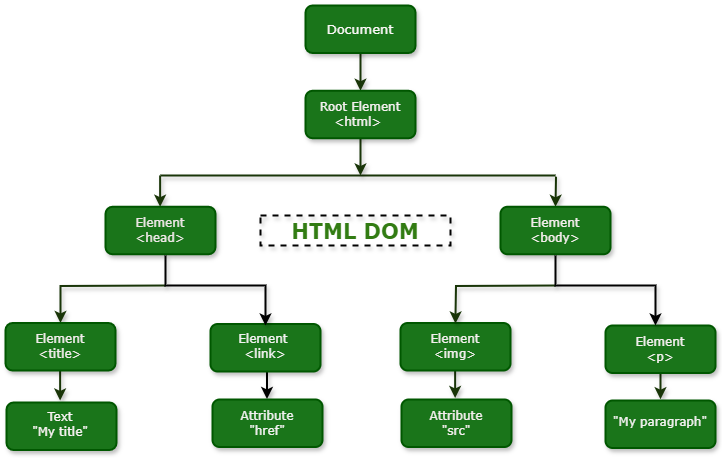
HTML is parsed, meaning the browser reads it carefully and understands the structure. From this, it builds something called the DOM (Document Object Model).
The DOM is a tree-like structure where every HTML element becomes a node. Nested tags become parent and child nodes. If you imagine your webpage as a family tree, the DOM is that tree.
CSS Parsing and CSSOM Creation
The browser reads CSS rules, understands selectors, colors, fonts, and layouts, and builds the CSSOM (CSS Object Model). While the DOM describes what exists on the page, the CSSOM describes how it should look.
How DOM and CSSOM Come Together
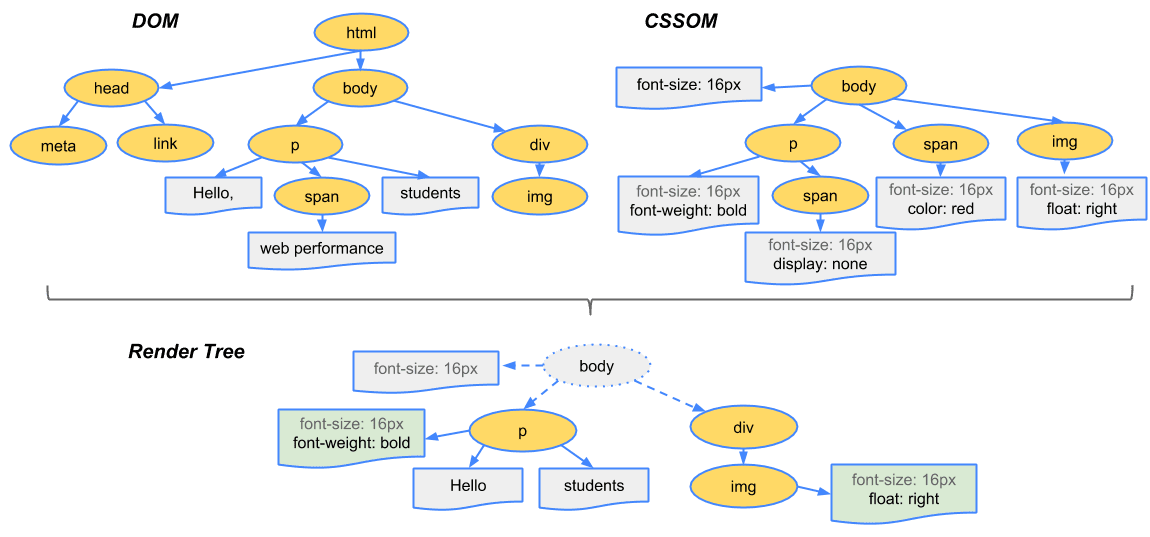
Once both trees are ready, the browser combines them.
This combination creates the Render Tree.
Important idea:
The render tree only includes visible elements
Things like
display: nonedon’t make it in
This tree represents what will actually be drawn on the screen.
Layout, Painting, and Display
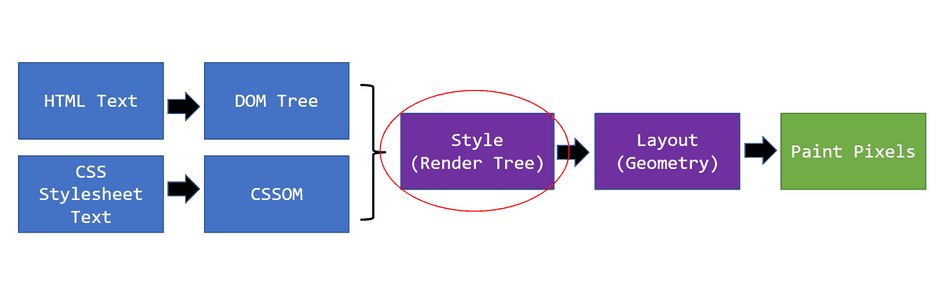
Now the browser switches from thinking in structure to thinking in pixels.
During layout (also called reflow), the browser calculates the size and position of every visible element. After that comes painting, where colors, text, borders, and shadows are drawn layer by layer. Once painting is complete, the final image is displayed on your screen.
This is the moment when a webpage truly comes to life.
Parsing
Take this math expression:
2 + 3 × 4
You don’t read it left to right blindly. You understand:
Multiplication happens first
Then addition
Your brain builds a small tree of meaning.
That’s parsing.
Browsers do the same thing—just with HTML, CSS, and JavaScript.
Full Flow: From URL to Pixels
You type a URL and press Enter
Browser fetches resources over the network
HTML becomes the DOM
CSS becomes the CSSOM
DOM + CSSOM become the render tree
Layout calculates positions
Painting draws pixels
The page appears
Conclusion
You don’t need to remember every internal detail to understand how a browser works. What really matters is the flow—from typing a URL, to fetching files, to building structure, and finally painting pixels on your screen. A browser is simply a well-organized system that translates code into something you can see and interact with. Once you understand this journey at a high level, everything else you learn about the web will start fitting into place naturally.


